
Twitter Streaming and Language Detection
Collecting 15K tweets from the Twitter Streaming API, comparing language detection methods, and analyzing geolocation patterns.
Abstract#
Collect tweets from the Twitter Streaming API, compare Twitter’s built-in language tags against langid.py, and see what happens when you filter by geographic bounding box.
The first homework for this NLP class was about getting data from Twitter and doing some basic analysis on it. The Twitter Streaming API lets you tap into a sample of the global tweet firehose in real time. We collected two batches of 15,000 tweets: one worldwide sample and one filtered to the continental United States using a geographic bounding box. Then we compared language detection methods and looked at geotagging rates.
Collecting tweets#
The Twitter Streaming API gives you a sample of tweets as they happen. The statuses/sample endpoint returns a random subset of all public tweets worldwide. To get USA-only tweets, you pass a bounding box of coordinates to statuses/filter.
Here’s the worldwide collection script:
from twitter import Twitter, OAuth, TwitterHTTPError, TwitterStream

oauth = OAuth(ACCESS_TOKEN, ACCESS_SECRET, CONSUMER_KEY, CONSUMER_SECRET)
twitter_stream = TwitterStream(auth=oauth)

# Random sample of worldwide public tweets
iterator = twitter_stream.statuses.sample()

tweet_count = 15000
for tweet in iterator:
    tweet_count -= 1
    print(json.dumps(tweet))
    if tweet_count <= 0:
breakFor the USA filter, the only difference is using statuses.filter with a bounding box covering the continental US:
iterator = twitter_stream.statuses.filter(
    locations='-125.52,25.68,-68.07,48.84'
)The bounding box is four numbers: southwest longitude, southwest latitude, northeast longitude, northeast latitude. This particular box covers roughly the lower 48 states.
One thing to know about the streaming API: the response includes more than just tweets. You also get delete notices (when a tweet gets removed) and limit notices (when the API is throttling). Out of 15,000 lines from the worldwide stream, only 13,239 were actual tweets with text content. The USA stream was cleaner at 14,986 proper tweets out of 15,000.
Language detection: Twitter API vs langid.py#
Every tweet from the Twitter API comes with a lang field that contains Twitter’s own language classification. We also ran each tweet through langid.py, an open-source language identification library, and compared the two.
The numbers:
- Twitter API detected 39 distinct language tags across the worldwide tweets
- langid.py detected 87 distinct languages on the same data
- The two methods agreed 80.4% of the time and disagreed 19.6%
The disagreement isn’t surprising when you think about what tweets look like. A lot of tweets are short, contain URLs, have emoji or unicode characters, or mix languages. A tweet that’s just a link and a couple words doesn’t give either system much to work with. Twitter’s API tended to handle English tweets with embedded URLs better, while langid.py was more aggressive about assigning specific language codes.
The worldwide language distribution according to the Twitter API broke down like this:
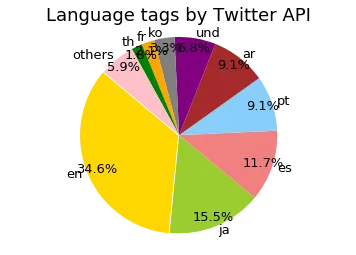
Language distribution of 15,000 worldwide tweets as classified by the Twitter API. English is the largest at 34.6%, followed by Japanese at 15.5%, Spanish at 11.7%, and Portuguese and Arabic around 9% each.
And the same tweets classified by langid.py:
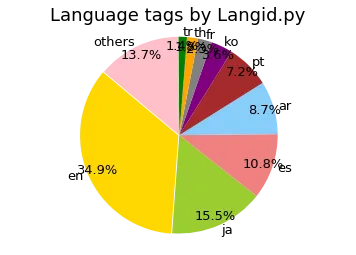
The same tweets classified by langid.py. The general shape is similar, but langid.py spreads the distribution across 87 languages instead of 39. The “und” (undetermined) category from the Twitter API gets reclassified into specific languages by langid.py.
One of the bigger differences is the “und” (undetermined) category. The Twitter API tagged about 6.8% of tweets as undetermined. langid.py doesn’t have that concept; it always picks a language, even if it’s not confident. Whether that’s better depends on your use case. If you’re building a dataset for a specific language, langid.py’s false positives on short tweets might be worse than Twitter’s honest “I don’t know.”
The grouped bar chart makes the per-language comparison easier to see:
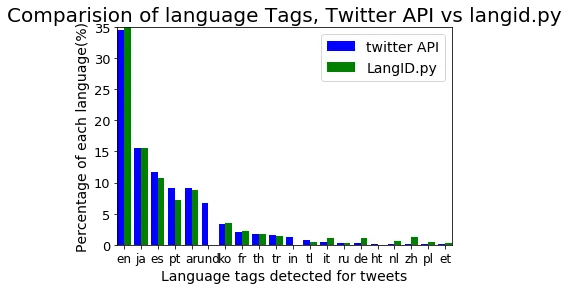
Twitter API (blue) vs langid.py (green) for the top 20 language tags. The two methods mostly agree on the dominant languages but differ on the long tail.
USA vs worldwide#
Filtering to the USA changed the language distribution dramatically. English went from 34.6% of worldwide tweets to 85.7% of USA tweets. That’s expected, but seeing the actual numbers puts it in perspective.
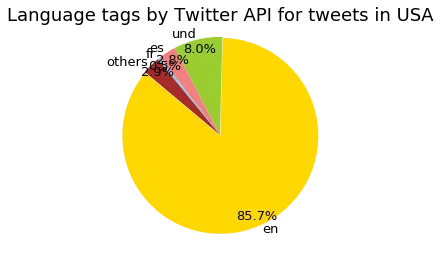
Language distribution of 15,000 USA-filtered tweets. English dominates at 85.7%, with “und” (undetermined) at 8.0% and Spanish at 2.8%.
The worldwide vs USA comparison as a bar chart:
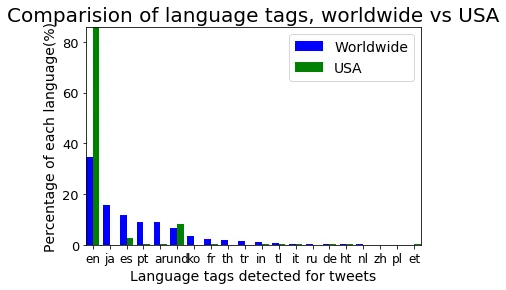
Worldwide (blue) vs USA (green) language distributions for the top 20 tags. English takes over in the USA data, while Japanese, Korean, Thai, and Arabic nearly disappear.
Geotagging#
The geotagging numbers were interesting. For the worldwide sample, only about 35% of tweets had geotagging enabled on the user’s account (about 40% of proper tweets). For the USA-filtered tweets, it was effectively 100%.
That 100% figure makes sense once you think about how the bounding box filter works. The statuses/filter endpoint with locations only returns tweets that have geographic coordinates attached. If a tweet doesn’t have location data, it doesn’t match the filter. So by definition, every tweet in the USA set is geotagged. It’s a selection effect, not a statement about how many American Twitter users enable location sharing.
The 35% worldwide figure is the more meaningful number. It tells you that roughly a third of Twitter users (at the time this data was collected, in late 2017) had location sharing turned on for their accounts. For any research that depends on tweet geolocation, that’s the fraction of data you have to work with.
What I took away from this#
This was a good first assignment for getting comfortable with real-world text data. Tweets are messy. They’re short, full of URLs and special characters, and come in dozens of languages. The language detection comparison drove home that even a seemingly simple task like “what language is this text” doesn’t have a clean answer when the text is 140 characters and half of it is a URL.
The bounding box trick for geographic filtering was also new to me. It’s a clean API, but it’s worth remembering that it only works on tweets with coordinates, which biases your sample toward users who opt into location sharing.